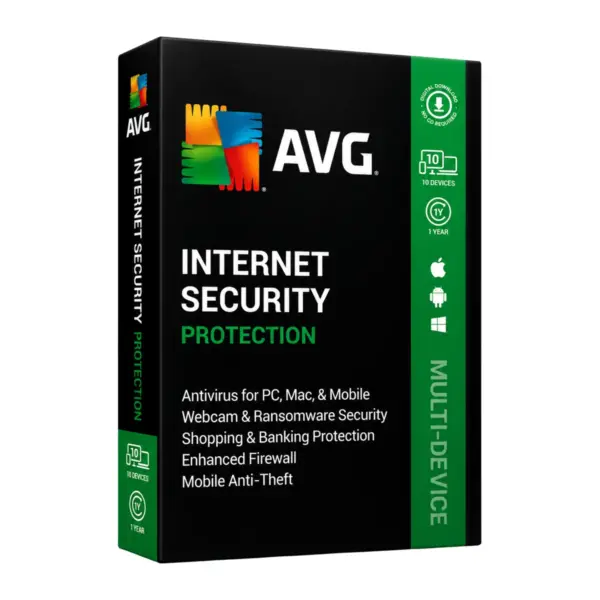
AVG Internet Security 1 Year 10 Devices – Antivirus Licence Key (Email Delivery)
One AVG Internet Security licence covering up to ten devices for a year. It is built for households and small offices where one antivirus has to stretch across laptops, Macs and phones. The key is emailed to you as soon as your payment is confirmed and you spread it across devices from a single AVG account.
Subscription
Devices
Pay securely by UPI, cards, net banking or wallets
Your key is shown on the confirmation page and emailed to you as soon as your payment is confirmed.
- Genuine licence keyActivates directly with the publisher
- 30-day refund if unrevealedOr a replacement if the key fails
- Sold by Digiheave Private LimitedRegistered company in Delhi · GSTIN 07AAICD0436A1Z9
Choosing the right plan size
This plan covers 10 devices and gives you cover for one year. It suits a large household or a small office with many devices.
At ₹885, it works out to about ₹89 per device per year. That is about ₹361 less per device than the 1 Year / 1 PC plan.
| Plan | Price | Per device per year |
|---|---|---|
| 1 Year / 1 PC | ₹449 | ₹449 |
| 1 Year / 10 Devices This plan | ₹885 | ₹89 |
| 2 Years / 10 Devices | ₹1,199 | ₹60 |
| 3 Years / 10 Devices | ₹1,499 | ₹50 |
Who this licence is for
Ten device slots on one key, for one year. This is the licence to buy when the problem is not one computer but a whole houseful — two laptops, a desktop, everyone’s phones, a tablet that mostly the kids use.
Small offices use it the same way. Because the slots are managed from one AVG account, you can see what is protected and move a slot to a new machine when an old one is retired.
What you get
- Twelve months of AVG Internet Security across up to ten devices, in any mix of platforms.
- Real-time antivirus and anti-ransomware protection on each installed device.
- An enhanced firewall on Windows, plus email and web link checks.
- Protection while you shop and bank online, including warnings about fake sites.
- Windows 10 and Windows 11, macOS 11 or later, Android 8 or later and iOS 15 or later — mix them as you like until the ten slots are used.
How delivery and activation work
You pay securely online by UPI, card, net banking or wallet. The key is delivered by email after payment.
- Step 1 — Place the order and copy the key from your confirmation email.
- Step 2 — Sign in at https://account.avg.com and open “Subscription activation”.
- Step 3 — Paste the key to attach the subscription to your account.
- Step 4 — Install AVG on each device from https://help.avg.com/en/install/ and sign in with the same account so the slot is claimed automatically.
Renewal and support
Can I use this on an AVG subscription that is already running?
Yes. Activate the key in the account holding your current AVG Internet Security and the twelve months are added to the existing end date. It does not start a second, separate subscription.
If something does not activate
Contact support within seven days with your order number and the AVG error message. You will be sent a replacement key or given a full refund. TrustedAV sources every key from authorised distribution channels, and support is available 24×7.
Specifications
| Brand | AVG |
|---|---|
| Product | AVG Internet Security |
| Licence term | 1 year |
| Devices | 10 |
| Platforms | Windows 10 and Windows 11, macOS 11 or later, Android 8 or later, iOS 15 or later |
| Delivery | Licence key on screen and by email after payment |
| Format | Digital licence key |
| Region | Global, region-free; sold and priced in INR for customers in India |
| MPN | AVG-IS20T12ENK-10 |
| Renewal | Can be used to extend an existing subscription of the same product |
| Refund | Full refund within 30 days if the key hasn't been revealed; replacement or refund if it fails to activate within 30 days |
| SKU | TAV-AVG-IS-1Y-10D |
How to activate AVG
- 1
Find your key
It is on your order confirmation page and in the email we send as soon as payment is confirmed.
- 2
Redeem it with AVG
Sign in or create an account on the official AVG site and enter the key exactly as shown.
- 3
Install
Download the installer AVG offers and check the remaining subscription term in the app.
Questions about AVG Internet Security 1 Year 10 Devices – Antivirus Licence Key (Email Delivery)
How and when will I get my key?
It is ready to reveal on a scratch card on the order confirmation page, and the email gives you a private link to it once payment is confirmed, usually within a minute.
Is this a genuine AVG licence?
Yes. It is a retail key sourced from authorised distribution channels and activated in your own AVG account.
Will it work on Windows 11?
Yes. It covers Windows 10 and Windows 11, as well as macOS 11 or later, Android 8 or later and iOS 15 or later.
Can I use it to renew an existing AVG subscription?
Yes. Activating it in the same AVG account extends your current AVG Internet Security term instead of opening a new one.
Do all ten devices have to be the same type?
No. You can split the ten slots across Windows PCs, Macs, Android phones and iPhones in any combination.
Can I move a device slot later?
Yes. Remove an old device from your AVG account and the slot becomes free for a new one.
What if the key does not work?
Write to our support team within seven days with your order number and you will get a replacement key or a full refund.
Do I need to uninstall my old antivirus first?
Yes, on each Windows PC. Remove any other antivirus before installing AVG so the two do not interfere with each other.
Refund policy
You can ask for a full refund within 30 days of your order if you have not revealed your key. If we cannot deliver your key, or the key does not activate, we replace it or refund you in full within 30 days of purchase. Email us with your order number and a screenshot of the error.
More licence keys