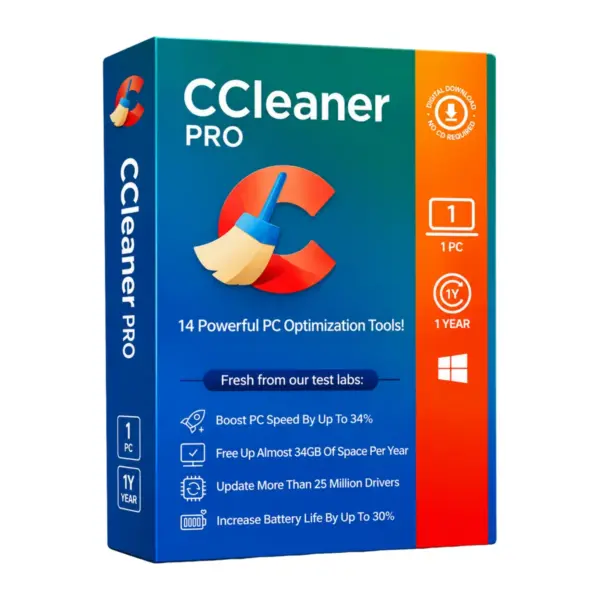
CCleaner Professional 1 Year 1 PC (Global) – PC Optimisation Licence Key (Email Delivery)
CCleaner Professional is an optimisation and privacy tool for Windows, not an antivirus, so it is best used alongside a security suite. This licence covers one PC for a year. The key is emailed to you as soon as your payment is confirmed and is entered inside the CCleaner app.
Subscription
Devices
Pay securely by UPI, cards, net banking or wallets
Your key is shown on the confirmation page and emailed to you as soon as your payment is confirmed.
- Genuine licence keyActivates directly with the publisher
- 30-day refund if unrevealedOr a replacement if the key fails
- Sold by Digiheave Private LimitedRegistered company in Delhi · GSTIN 07AAICD0436A1Z9
Who this licence is for
Is CCleaner an antivirus?
No. CCleaner Professional is a cleaning, privacy and optimisation tool. It removes junk files and browsing traces, but it does not detect malware, so use it alongside an antivirus rather than instead of one.
It is for anyone whose Windows PC is running short of disk space or feels slower than it did, and for anyone who wants browser history, cookies and cached files cleared out on a schedule instead of by hand. This licence covers one PC for a year, and the key is global, so it activates from India without restriction.
What you get
- Twelve months of CCleaner Professional on one Windows PC, with program updates included.
- Junk file clean-up across Windows, browsers and third-party applications, recovering disk space.
- Privacy cleaning of history, cookies and cached data in the browsers you use.
- Scheduled and automatic cleaning, so the maintenance happens whether or not you remember it.
- Real-time monitoring that alerts you when junk builds up, plus the registry cleaner and startup manager.
- Priority customer support from the vendor, which the free edition does not include.
How delivery and activation work
You pay securely online by UPI, card, net banking or wallet. The key is emailed to you at once — CCleaner is activated inside the app rather than on a website.
- Step 1 — Complete the order and note the registration name and key from your confirmation email.
- Step 2 — Download CCleaner Professional from https://ccleaner.com/go/get_ccpro and install it.
- Step 3 — Open the app, go to Options, then About, then “Upgrade to Pro”.
- Step 4 — Enter the name and key exactly as supplied, and check that the title bar now reads Professional.
Renewal and support
Can I use this to renew?
Yes. If CCleaner Professional is already registered on the PC, entering this key extends the existing subscription of the same product for a further year.
If the key is not accepted
Check that the registration name matches the email exactly, including spacing. If it still fails, contact support within seven days with your order number and TrustedAV will send a replacement key or refund you in full.Support is available 24×7 by call, WhatsApp or email.
Specifications
| Brand | CCleaner |
|---|---|
| Product | CCleaner Professional (PC optimisation software, not antivirus) |
| Licence term | 1 year |
| Devices | 1 PC |
| Platforms | Windows 10 and Windows 11 |
| Delivery | Licence key on screen and by email after payment |
| Format | Digital licence key |
| Region | Global, region-free; sold and priced in INR for customers in India |
| MPN | CCPRO11 |
| Renewal | Can be used to extend an existing subscription of the same product |
| Refund | Full refund within 30 days if the key hasn't been revealed; replacement or refund if it fails to activate within 30 days |
| SKU | TAV-CCL-PRO-1Y-1PC |
How to activate CCleaner
- 1
Find your key
It is on your order confirmation page and in the email we send as soon as payment is confirmed.
- 2
Redeem it with CCleaner
Sign in or create an account on the official CCleaner site and enter the key exactly as shown.
- 3
Install
Download the installer CCleaner offers and check the remaining subscription term in the app.
Questions about CCleaner Professional 1 Year 1 PC (Global) – PC Optimisation Licence Key (Email Delivery)
Is CCleaner Professional an antivirus?
No. It is a PC optimisation and privacy tool. Keep an antivirus installed as well, since CCleaner does not scan for malware.
How and when will I get my key?
The registration name and key are ready to reveal on a scratch card on the order confirmation page, and the email gives you a private link to it once payment is confirmed.
Will it work on Windows 11?
Yes. CCleaner Professional supports Windows 10 and Windows 11.
How do I activate it?
Install CCleaner, then open Options, About and "Upgrade to Pro", and enter the name and key from your email.
Can I use it to renew my existing CCleaner Professional subscription?
Yes. Entering the key on a PC already running CCleaner Professional extends the current subscription.
How many PCs and how long?
One Windows PC for one year from the date you register the key.
What if the key does not work?
Contact support within seven days with your order number and you will get a replacement key or a full refund.
Refund policy
You can ask for a full refund within 30 days of your order if you have not revealed your key. If we cannot deliver your key, or the key does not activate, we replace it or refund you in full within 30 days of purchase. Email us with your order number and a screenshot of the error.
More licence keys